
001-002-00000
care@solaceandmore.com
woodvale Street 2
Nairobi westland
8:00am - 5:00pm
Monday-Friday
Marked Safe or Missing: How Facebook Safety Check Works During Disasters
Understanding Facebook's emergency notification system and its lessons for personal crisis planning.

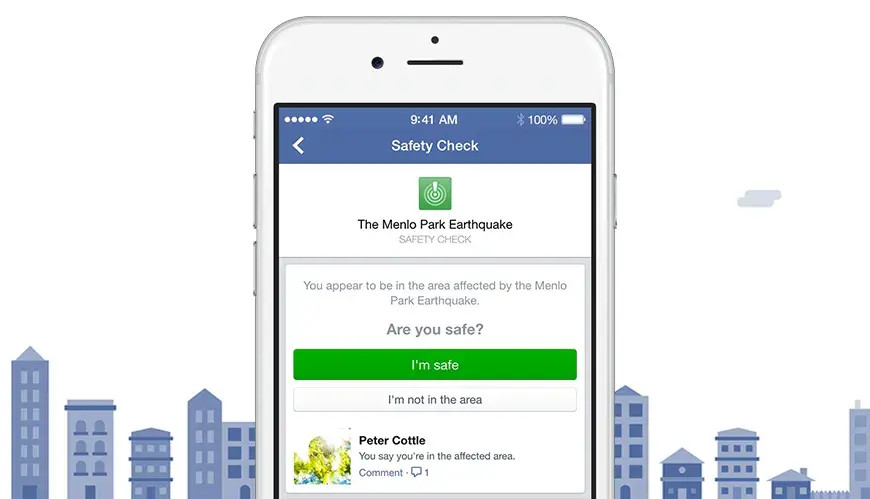
When disaster strikes, the most frightening moment often comes after the event itself — when messages go unanswered and confirmation doesn’t arrive.
In the hours following earthquakes, terror attacks, floods, or explosions, millions of people search for the same reassurance: Are my loved ones safe? Phone networks fail, information spreads unevenly, and silence quickly fills the gaps.
What Is Facebook Safety Check?
Over the past decade, digital safety tools have emerged to reduce that uncertainty. One of the most widely used is Facebook Safety Check, a system designed to help people in affected areas quickly confirm their safety and notify friends and family during major crises.
But while Safety Check has transformed how reassurance travels during disasters, it also exposes something deeper - how much emotional weight we place on confirmation, and how distressing it can be when that confirmation never comes.
Understanding how Safety Check works - and where its limits lie - offers insight not only into crisis communication, but into how humans cope with fear, uncertainty, and the fragile need to know who is still here.
How Facebook Safety Check Actually Works
Crisis Detection and Activation
Facebook uses multiple methods to detect and activate Safety Check:
Automated Detection (Post-2016):
Facebook's algorithms monitor several data sources to identify potential crises:
Sudden spikes in posts from a specific geographic location
News reports and media coverage
Official alerts from government agencies and emergency services
User reports flagging an incident
When the system detects a potential crisis, it can automatically activate Safety Check for users in the affected area.
Community-Activated Checks:
In 2016, Facebook shifted from company-only activation to community-activated checks. If enough people in an area post about the same crisis event, the system can trigger Safety Check even before official confirmation, ensuring faster response times.
How Safety Confirmation Happens During a Crisis
Once Safety Check is activated for a crisis:
Automatic Notification: Users in the affected area receive a notification asking if they're safe
One-Tap Response: Users can mark themselves safe with a single tap
Location Verification: Facebook uses the user's location data (check-ins, location services, city listed in profile, IP address) to determine who should receive the prompt
Instant Broadcast: The safety status is immediately posted to the user's timeline and sent as notifications to friends and family.
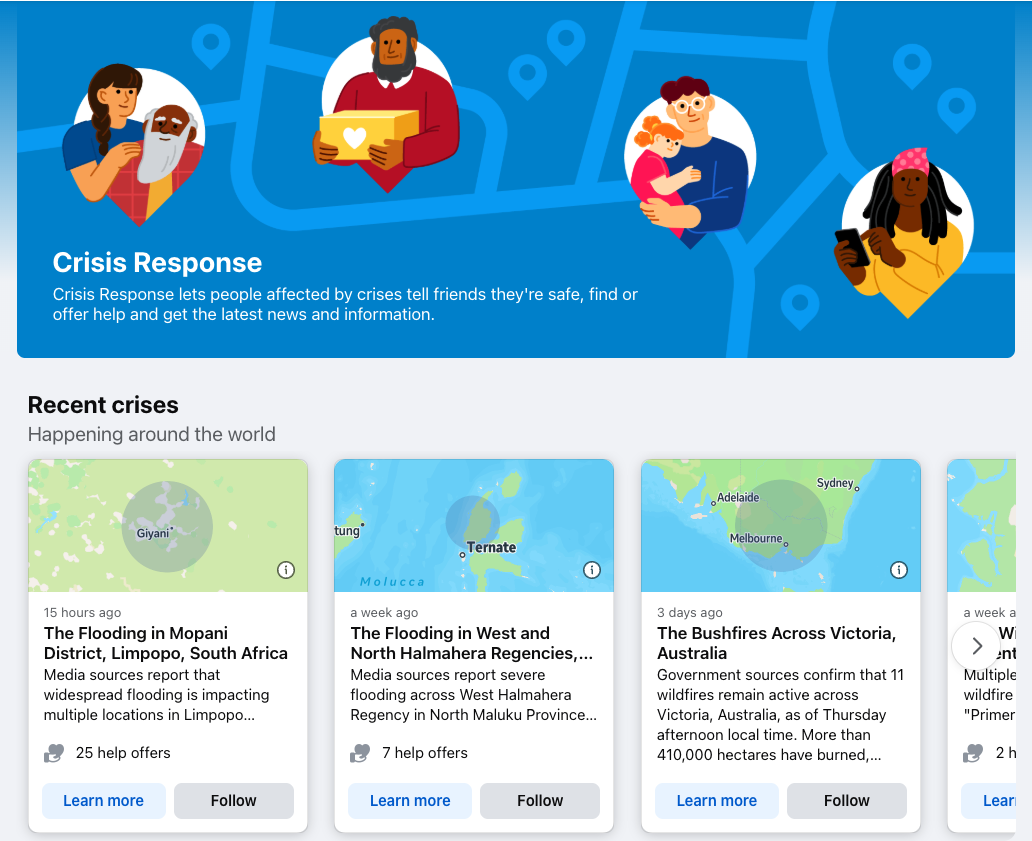
During emergencies, people often turn to Safety Check to look for reassurance about friends and family - especially when direct communication isn’t possible.
How to check if someone marked themselves safe:
Go to facebook.com/safetycheck on your computer or phone
Look for the current active crisis (it will appear prominently if one is ongoing)
Click "See who's safe" or search for your loved one's name
If they've marked themselves safe, you'll see a notification with the time they confirmed it
If they haven't marked themselves safe yet: This doesn't mean they're in danger. Many people don't see the notification, their phone battery might be dead, or they might not have internet access. The absence of a safety check is not confirmation of death.
When “Marked Safe” Never Comes
Not seeing a Safety Check confirmation doesn’t automatically mean danger - but emotionally, it often feels that way.
Phones die. Internet access disappears. Some people never see the notification. Others are elderly, offline, or already displaced. In the most painful cases, confirmation never arrives at all.
This uncertainty has a name: ambiguous loss - the distress of not knowing whether someone is safe, reachable, or gone. Digital safety tools can reduce this pain, but they cannot eliminate it entirely.
Understanding this limitation is crucial, not just for emergencies, but for how families prepare for moments when communication fails.
When confirmation never comes and grief sets in, digital tools like grief apps can offer ongoing support to help families process loss and find community during their darkest moments.
Key Features Beyond "Marked Safe"
Community Help
Added in 2017, this feature allows people to:
Offer help (shelter, food, transportation)
Request help
Find help from others in their community
Organize crisis response at the grassroots level
Crisis Resources
Facebook partners with organizations to provide:
Official information from emergency services
Fundraising opportunities for relief efforts
Links to local resources and shelters
Real-time updates about the developing situation
Find Friends Feature
Users can check which friends are in the affected area and see whether they've marked themselves safe, making it easy to follow up with those who haven't responded.
Lessons from Facebook for Personal Crisis Planning
What can we learn from Facebook's approach to crisis planning?
1. Plan before the crisis: Safety Check works because the infrastructure exists before disaster strikes. Similarly, end-of-life planning works best when done proactively, not reactively.
2. Make it accessible: The feature succeeds through simplicity. Your important documents and wishes should be just as easy for loved ones to access.
3. Notify the right people: Safety Check knows who needs to know. Your planning should ensure the right people have the right information at the right time.
4. Update regularly: Facebook constantly improves its systems. Life and end-of-life plans need regular updates too - after marriages, divorces, births, deaths and major life changes.
5. Don't wait for the perfect system: Facebook launched Safety Check and improved it over time. Starting your planning - even imperfectly - is better than waiting.
6. Communicate clearly: Just as Safety Check provides instant updates during a crisis, in the event of loss; a well-written obituary ensures everyone receives accurate information about services and how to help. Learn how to write an obituary that honours your loved one's memory.
Conclusion: From Safety Checks to Safety Nets
Want to create your family's safety net? While Facebook helps you communicate during disasters, thoughtful end-of-life planning ensures your loved ones have the information they need during life's most certain transition. [Learn more about pre-loss planning & post-loss planning.]
Frequently Asked Questions
Because these questions come up for many - here’s what to know.
As of 2026, you don't "turn on" Facebook Safety Check like a setting; it activates automatically during major crises (like natural disasters) in affected areas, prompting you to mark yourself as safe or check on friends via notifications or the Crisis Response page in the menu, allowing you to quickly update your status and see if others are okay
If you have friends or family in an affected area, you can check on them through the Safety Check page for that crisis. However, you can only mark yourself safe if Facebook's systems determine you might be in the affected zone.
You can remove your safety status by going to the Safety Check post on your timeline and clicking "Remove."
No, you need an internet connection (data or Wi-Fi) to mark yourself safe. However, it's often more reliable than phone networks during crises since it uses less bandwidth.
Facebook uses multiple data points including your current city, recent check-ins, IP address, and location services (if enabled) to determine if you're in an affected area.
They may not have seen the notification, may lack internet access, have location services disabled, or choose not to respond.
On this page
- Introduction
- What Is Facebook Safety Check?
- How Facebook Safety Check Actually Works
- How Safety Confirmation Happens During a Crisis
- How to check if someone marked themselves safe
- Key Features Beyond "Marked Safe"
- Lessons from Facebook for Personal Crisis Planning
- Conclusion: From Safety Checks to Safety Nets
.png&w=1080&q=75)





.jpg&w=1080&q=75)


.jpg&w=1080&q=75)






Solace & more Newsletter
Losing someone you love changes everything. In the midst of grief, it's easy to forget to care for your own well-being. That's why we've put together a few simple, nourishing recipes—to support your body while your heart heals. Join our weekly grief care newsletter for comforting recipes, gentle guidance, and reminders that healing takes time — and you don't have to go through it alone
You may also like
Coffin vs Casket: Price Comparison, Photos & Which to Choose
Confused about coffins vs. caskets? Get clarity on designs, costs (from $400 to $15,000+), and cultural traditions. Learn how to choose respectfully & avoid funeral home upsells. Trusted by families worldwide.
Read More
Client-Facing & Ceremonial Jobs in the Funeral Service Industry
Death is a part of life, and the careers around it are more varied than you think. From Funeral Directors to Celebrants to guiding families in crisis to creating personalised ceremonies
Read More
How to Prepare for Death: 8 Essential Steps to Protect Your Family
Pre-Loss Planning: A Loving Guide to Saying Goodbye with Clarity
Read More
How to Choose a Grief Counselor: Steps, Questions & Support Options
Choosing the right grief counselor isn’t just about credentials. Here’s how to make the choice with clarity and confidence.
Read More
GoGetFunding: A Crowdfunding Company Built for Creators, Claimed by Grief
How GoGetFunding Became the World's Most Trusted Funeral Fundraising Platform
Read More
Grieving and Feeling Alone? These Apps Offer Real Support
Apps that give you comfort during your grieving period
Read More
How to Plan a Meaningful Funeral for Your Child
Practical guidance for planning a child's funeral after stillbirth, infant loss, or the death of an older child. Includes burial vs. cremation advice, cost considerations, and global support resources.
Read More
How to write the perfect obituary, according to funeral industry professionals
Why do some obituaries capture the heart? There’s nothing quite so moving as an obituary that truly captures and honours the spirit of the deceased.
Read More
Grieving After a State Execution: What Families Face and Where to Find Help
Learn how families can cope, honor their loved ones, and find healing in the face of death penalty grief.
Read More
What to Write in a Condolence Book: 30+ Examples & Complete Etiquette Guide
If grief had a guestbook, this is how you sign it.
Read More
Technical & Preparation Specialists in the Funeral Service Industry
Behind every goodbye are professionals most people never meet. From embalmers and thanatopracteurs to cremation and composting technicians, these roles blend science, art, and empathy to prepare loved ones for farewell.
Read More
A Three-Step Guide to Sorting a Deceased Loved One's Personal Belongings
Explore ways to honor a loved one through the things they left behind.
Read More
Do Banks Automatically Know When Someone Dies? Here’s the Truth
How do banks know that their client has died?
Read More
How to Choose a Keepsake That Honours Both Grief and Love
Ideas for gifts after loss
Read More
What Happens to Us When a Father Dies? The Psychology of Parental Loss
Dealing with loss of a father and when to reach out for support
Read More
Understanding Suicidal Ideation
Learn the difference between passive and active suicidal thoughts, how common they are worldwide, and why early support matters.
Read More
Grieving A Baby the World Never Met - Understanding Miscarriage.
Miscarriage is a devastating loss, not a personal failure
Read More
What Is Swedish Death Cleaning? Explained
Because one day, someone else will open your drawers.
Read More
Talking About Money When Someone Dies: A Faith-Based Perspective
Why are money conversations still taboo in faith spaces, especially when someone is dying?
Read More
Your email is safe with us, we do not spam! Unsubscribe at any time.